After a couple of months, my indoctrination into the world of all-things-Mac is coming along nicely. Once I made it over the "how does this work in OS X?" hurdle, I set my sights on replacing the daily-use applications from my Windows life, resulting in the list below.
Hopefully it will grease the skids for others making the same transition.
1 -- ADIUM
Adium is a free, full-featured instant messaging tool that supports most any messaging network you can throw at it.
The interface is very well laid-out. The tool itself is very reliable and is infinitely configurable with a multitude of available extras.
It replaces the likes of Trillian, Windows Live Messenger, and ICQ for Windows.
 2 -- AZUREUS
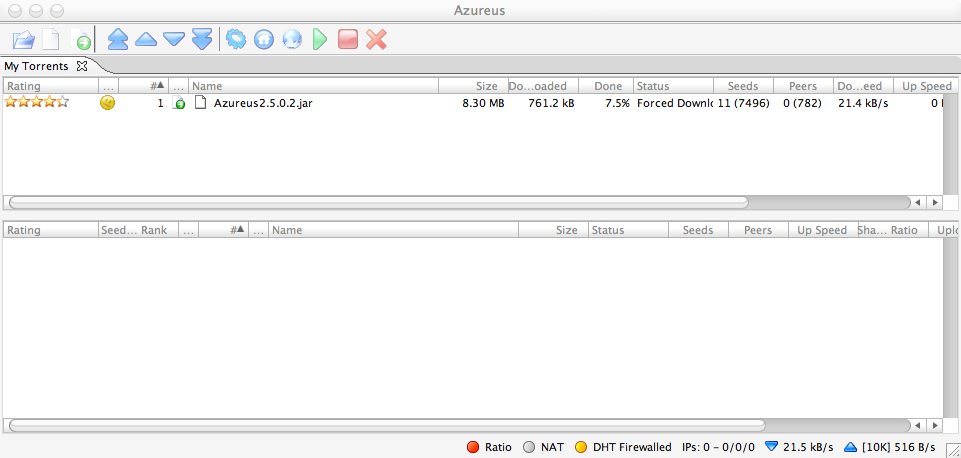
Azureus is a Java-based BitTorrent client. It is open source and regularly updated/improved.
The feature list is extensive and includes capabilities such as upload/download speed throttling, seeding rules, proxy support, customizable interface, and an embedded tracker system.
Azureus also offers numerous third-party plugins that further enhance the tool.
Colloquy is a fantastic IRC client with AppleScript and plugin capabilities.
I'll admit that it took a wee bit of time to acclimate to the single window/multi-tab aspect of the interface; I've been using ircII since the dawn of time. However, after a few days I found it to be exceedingly straightforward and easy to use.
It replaces the likes of mIRC for Windows.
Fugu is a simple graphical front-end for the command line tools SFTP and SCP.
All of the standard features you'd expect to find are here: File drag-and-drop, connection bookmarking, permissions/owner/group modifications, etc.
I've found Fugu to be somewhat 'testy' with respect to saving preferences, but it does get the job done. It is comparable to (but not nearly as reliable as) SSH for Windows. If you know of something better, please let me know.
Let's face it -- Photoshop is king, but Gimpshop (based on Gimp) should satisfy the needs of most.
Suffice to say that Gimpshop is a capable image editing tool, so I won't go get into any comparisons. What I will say is that Photoshop is not yet available in Universal binary for Mac Intel machines, meaning it is slow. Gimpshop, however, is offering a Universal binary; it is very fast in comparison.
Handbrake is one of the best video conversion tools I've ever used; Windows, Mac, or otherwise.
Using this tool you can convert a DVD source disk to AVI, MP4, or OGM. It is very fast and the output is of high quality (using either FFmpeg or Xvid codecs). Of particular note is the spectacularly handy task queuing mode.
The closest functionality for Windows users is offered by TMPGEnc.
MacTheRipper is a DVD extraction tool that allows for easy duplication of DVDs (yes, even protected ones).
It slices and dices out copy protection and regional coding as well as all sorts of other nifty things. The only thing it doesn't do is actually burn output to disc.
MacTheRipper is a nice replacement for DVDShrink from the Windows world.
Onyx is a nicely designed system management utility for OS X.
As a Windows-convert, the various tasks involved in maintaining an OS X system weren't immediately apparent to me. Onyx has been supremely useful in this respect as it takes care of the mundane details of most necessary system maintenance.
As a side bonus, Onyx also allows modification of several hidden configuration options for Finder, Dock, Safari, Dashboard, Exposé, and Disk Utility.
There's not much to say except that Parallels is an awesome virtualization tool.
Similar to VMWare, it allows Mac Intel users to run Windows, Vista, and varying flavours of Linux within OS X. It is remarkably fast and offers support for shared networking and perhipherals. If you already use BootCamp, the latest versions of Parallels can piggyback over your existing Windows partition.
Be warned that lots of RAM is needed, especially if you plan to run Vista. It does work, but in the end Windows is Windows. Lots of RAM is required just to load, let alone use it. XP is 'somewhat' more forgiving.
Windows XP Professional and Server offer built-in remote access capabilities in the form of Remote Desktop. All versions of XP are bundled with Remote Desktop Viewer, which, as it turns out, is a remarkably efficient tool to access remote systems.
If you're anything like me, Remote Desktop is something that you can't live without. I specifically made sure that a viewer existed for OS X before I bought the computer as I need/use it on a daily basis at work.
Microsoft offers a version of Remote Desktop Client for OS X, as well. Despite the fact that it is compiled for PowerPC processors (and therefore requires emulation through Rosetta), speed is reasonable.
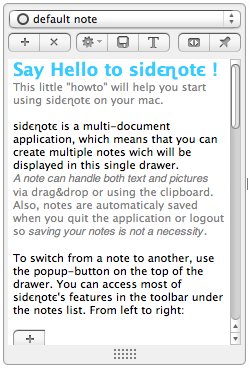
Sidenote is a novel application that lands somewhere between sticky notes and a pad of paper.
The tool sits hidden until activated then scrolls open to reveal a 'drawer' of notes that can be customized using normal RTF formatting. It allows for image, text, and PDF clipping from any application.
In my Windows life, this task is handled by constantly pumping Notes into Outlook, which was a bit ornerous and inefficient. Sidenote gives you easy access to notes in a small, unobtrusive package.
SuperDuper! is a superb system backup utility that allows for the creation of complete system backups, either manually or through a scheduler.
One of the most amazing features of this tool is that is makes a complete, working backup while OS X is running. This is an impossibility in Windows. The backups are so comprehensive, in fact, that if you dump your disk contents to an external USB drive, you can actually boot with that external drive.
The closest comparison for Windows is Acronis TrueImage.
Virtual desktops/workspaces have been around for a long time, but Virtue Desktops is a particularly nice implementation.
Handy features include the ability to bind particular applications to specific workspaces and fancy, configurable workspace shifting effects. Show your friends the screen flip between OS X and Windows -- it's guaranteed to make them jealous.
This tool works particularly well in combination with applications that run in full-screen mode or use a lot of screen real estate (e.g., Parallels or Apeture).
VLC is the best video viewer on any platform, hands down. It's extremely fast, extremely free, and offers support for the spectrum of audio and video formats (not to mention various streaming protocols).
Full screen mode is extremely welcome on OS X since QuickTime doesn't offer it in non-Pro versions.
Our old friend VNC is, thankfully, available for OS X. Highly insecure, but highly useful, its a handy gadget to have around when you need remote visual access to a machine.
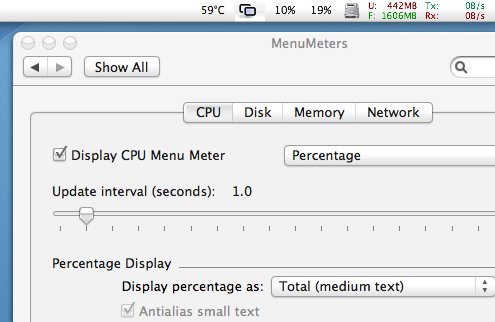
Menu Meters is like the Windows Task Manager on steroids.
Included is a set of high customizable CPU, memory, disk, and network monitoring tools. Each tool can be configured independently, or disabled altogether.
The best feature as far as I'm concerned is the fact that the displays are located in the menu bar where they won' be obscured by other windows.
ShapeShifter isn't exactly a system requirement, but it really is nice to have around.
It allows for near-complete customization of the OS X interface with themes, icon packs, cursors, etc. There are several theme repositories available with new ones being released regularly.
Windows has a similar tool in WindowBlinds ($50). ShapeShifter imposes less of a performance hit and costs only $20.
Digital Rights Management is a very touchy subject. Strangely enough, I work for a company with direct involvement in the field, but my personal views probably shouldn't be shared here if I want to remain gainfully employed.
DRM Dumpster strips DRM restrictions from Apple iTunes downloads by burning tracks to CDRW and re-encoding them as MP3s. iTunes v7.x (I'm using v7.0.2) is supported.
8 comments for this entry ↓
1 Miro // Jan 23, 2007 at 11:40 pm
Thanks for the tips.
I would add: The Missing Sync
http://www.markspace.com/missingsync_windowsmobile.php
connect and synchronize Pocket PCs and smartphones with your Mac. Sync with Address Book, iCal, Microsoft Entourage, iPhoto, iTunes
The Cocoa Remote Desktop - http://cord.sourceforge.net/
is also nice and (despite the low version number) pretty good.
CHM documents reader - http://chmox.sourceforge.net/
Miro
2 dennis // Jan 24, 2007 at 7:20 pm
Miro: Wow, I didn't know about CoRD -- it works great! Thanks for the link.
The Missing Sync also looks very nice. I've got a Blackberry, but it appears that help is on the way. Hopefully it'll work a bit better than PocketMac.
3 Hans // Feb 7, 2007 at 12:33 pm
Hey does VLC play rmvb/rmv files? I'm looking for a video player -cross platform that allows to install plugins with it too. Thanks indeed for the list.
4 dennis // Feb 7, 2007 at 9:32 pm
Hans: It does play Real Audio, but unfortunately, doesn't handle video as Real keeps the codecs proprietary. More information here: http://wiki.videolan.org/Real_Media_Video
5 dennis.ca » Macbook Pro Review Redux // Mar 4, 2007 at 11:43 pm
[...] become comfortable with OS X — and I like it just fine. In fact, I’ve compiled a list of ‘must have’ tools that help me on a daily basis. The open source and shareware communities for OS X are strong and [...]
6 Brent // Jul 7, 2007 at 11:01 pm
Something that's absolutely indispensable is Quicksilver. I cringe at the thought of sitting down at a Windows machine without my Quicksilver. There's just nothing comparable. In that sense I guess it doesn't fit perfectly under the topic of your post, but it's a great tool nonetheless.
7 James // Jul 19, 2007 at 7:31 pm
There is something like quicksilver, it is called launchy and it is wonderful. At work I use a windows PC so I needed something similar and I am very happy with it.
8 dennis // Jul 19, 2007 at 7:51 pm
James: Funny you mention it, I was just reading about it this morning. Definitely sounds like it's something I need to look at, thanks!
Leave a Comment